
10 KiB
🔐 KoBackup Decryptor
Decrypt Huawei HiSuite & KoBackup encrypted backups
CLI + Modern GUI • Selective Folder Decryption • Password Verification



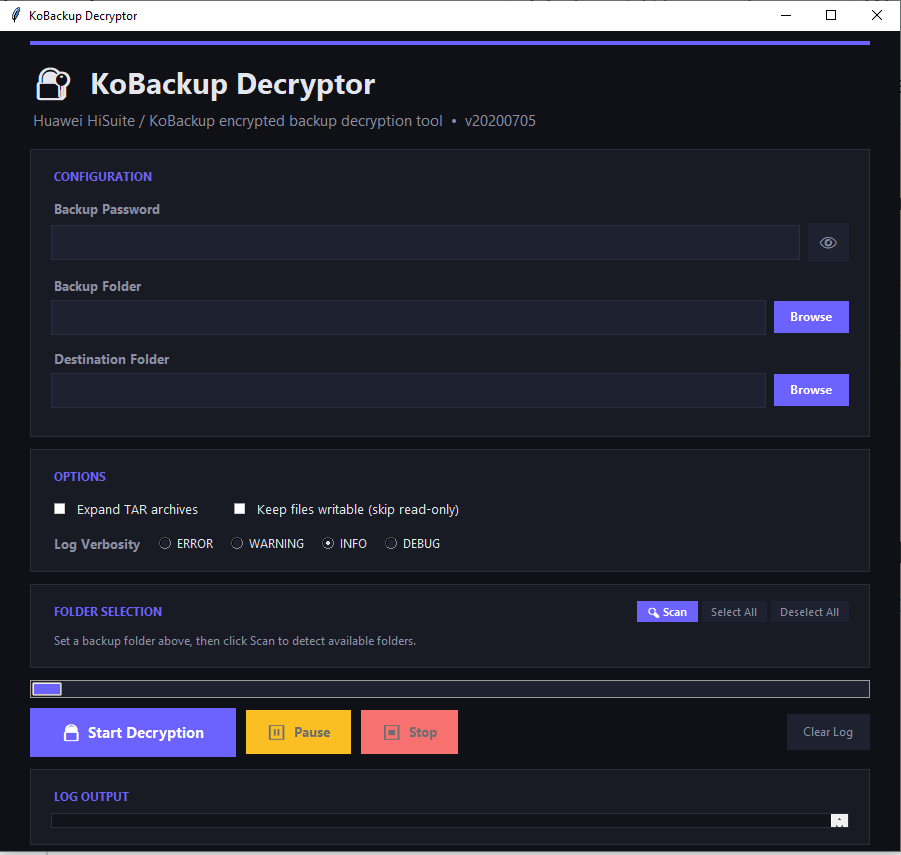
Modern dark-themed GUI with selective folder decryption, pause/stop controls, and real-time log output
📖 Overview
KoBackup Decryptor (kobackupdec) is a Python 3 tool for decrypting Huawei HiSuite and KoBackup (Android app) encrypted backups. It supports both v9 and v10 backup structures.
When decrypting, it automatically:
- Reorganizes the output folder structure to mimic a typical Android filesystem
- Extracts and expands TAR archives (optional)
- Handles large files in chunks for memory efficiency
✨ What's New — GUI Edition
This fork adds a full-featured graphical interface built with tkinter, bringing the power of kobackupdec to users who prefer a visual workflow.
| Feature | CLI | GUI |
|---|---|---|
| Decrypt full backups | ✅ | ✅ |
| Password verification before decrypt | — | ✅ |
| Selective folder decryption | — | ✅ |
| Pause / Resume / Stop controls | — | ✅ |
| Real-time color-coded log output | — | ✅ |
| Progress tracking with status updates | — | ✅ |
| Responsive dark-themed interface | — | ✅ |
🚀 Installation
Prerequisites
- Python 3.7 or later
- pip (Python package manager)
Steps
# 1. Clone the repository
git clone https://github.com/YOUR_USERNAME/kobackupdec.git
cd kobackupdec

# 2. Install dependencies
pip install -r requirements.txt
Dependencies
| Package | Purpose |
|---|---|
pycryptodome |
AES / PBKDF2 / HMAC cryptographic operations |
tkinter |
GUI framework (bundled with Python on most platforms) |
Note: On some Linux distributions, tkinter may need to be installed separately:
# Ubuntu / Debian
sudo apt-get install python3-tk

# Fedora
sudo dnf install python3-tkinter
🖥️ Usage
GUI Mode (Recommended)
Launch the graphical interface:
python kobackupdec_gui.py
GUI Workflow
- Enter Password — Type your backup password (toggle visibility with 👁)
- Select Backup Folder — Browse to the Huawei backup directory
- Select Destination — Choose where to save decrypted files (pick a parent, name the output folder)
- Configure Options — Toggle TAR expansion, writable permissions, and log verbosity
- Select Folders — After setting the backup path, click 🔍 Scan or it auto-scans to show available folders. Check/uncheck individual folders (pictures, video, audios, etc.)
- Start Decryption — Click 🔓 Start Decryption
GUI Controls
| Button | Function |
|---|---|
| 🔓 Start Decryption | Verifies password first, then begins decryption |
| ⏸ Pause / ▶ Resume | Temporarily halt and resume the process |
| ⏹ Stop | Cancel the decryption (partially decrypted files are kept) |
| Select All / Deselect All | Quickly toggle all folder checkboxes |
| 🔍 Scan | Re-scan backup directory for available folders |
| Clear Log | Clear the log output panel |
GUI Features
- 🔑 Password Verification — Validates the password against
info.xmlbefore starting decryption. Wrong passwords are caught instantly. - 📂 Selective Folder Decryption — Only decrypt what you need (e.g., just pictures and contacts, skip video and apps).
- 📊 Real-Time Progress — Status bar shows current phase and folder being processed.
- 🎨 Dark Theme — Modern, responsive dark interface with color-coded log levels (green=info, yellow=warning, red=error).
- 📐 Responsive Layout — Resizes gracefully from 600×500 to fullscreen. Folder checkboxes reflow automatically.
CLI Mode
For scripting and automation, the original command-line interface is fully preserved:
usage: kobackupdec.py [-h] [-e] [-w] [-v] password backup_path dest_path

Huawei KoBackup decryptor version 20200705

positional arguments:
  password         user password for the backup
  backup_path      backup folder
  dest_path        decrypted backup folder

optional arguments:
  -h, --help       show this help message and exit
  -e, --expandtar  expand tar files
  -w, --writable   do not set RO permission on decrypted data
  -v, --verbose    verbose level, -v to -vvv
CLI Example
python kobackupdec.py -vvv 123456 "Z:\HUAWEI P30 Pro_2019-06-28 22.56.31" Z:\HiSuiteBackup
📋 Click to see example output
INFO:root:getting files and folder from Z:\HUAWEI P30 Pro_2019-06-28 22.56.31
INFO:root:parsing XML files...
INFO:root:parsing xml audio.xml
DEBUG:root:parsing xml file audio.xml
INFO:root:parsing xml document.xml
DEBUG:root:parsing xml file document.xml
INFO:root:parsing xml info.xml
DEBUG:root:ignoring entry HeaderInfo
DEBUG:root:ignoring entry BackupFilePhoneInfo
DEBUG:root:ignoring entry BackupFileVersionInfo
INFO:root:parsing xml picture.xml
DEBUG:root:parsing xml file picture.xml
INFO:root:parsing xml video.xml
DEBUG:root:parsing xml file video.xml
DEBUG:root:crypto_init: using version 3.
DEBUG:root:SHA256(BKEY)[16] = b'8d969eef6ecad3c29a3a629280e686cf'
...
📁 Output Structure
The decrypted output folder mimics a standard Android filesystem:
DecryptedBackup/
├── data/
│   ├── app/                    # APK files
│   │   ├── com.example.app.apk-1/
│   │   └── org.telegram.messenger.apk-1/
│   └── data/                   # App data (TAR contents)
│       ├── com.example.app/
│       └── org.telegram.messenger/
├── db/                         # System databases
│   ├── calendar.db
│   ├── calllog.db
│   ├── contact.db
│   ├── sms.db
│   └── ...
├── storage/                    # Media files
│   ├── DCIM/
│   ├── Download/
│   ├── Pictures/
│   ├── WhatsApp/
│   └── ...
└── unknown/                    # Unrecognized files (copied as-is)
📋 Requirements
| Requirement | Minimum Version |
|---|---|
| Python | 3.7 |
| pycryptodome | Any recent |
| Operating System | Windows, Linux, macOS |
⚙️ Building Executables
You can compile the scripts into standalone executables using cx_Freeze:
# Build executable
python setup.py build

# Build Windows MSI installer
python setup.py bdist_msi
🗂️ Project Structure
kobackupdec/
├── kobackupdec.py          # Core decryption engine (CLI)
├── kobackupdec_gui.py      # GUI application (tkinter)
├── requirements.txt        # Python dependencies
├── setup.py                # cx_Freeze build config
├── LICENSE                 # MIT License
├── README.md               # This file
├── CHANGELOG.md            # Version history
└── .github/
    └── ISSUE_TEMPLATE/     # GitHub issue templates
📝 Changelog
See CHANGELOG.md for the full version history.
Highlights
- GUI Edition — Full graphical interface with selective decryption, pause/stop, and password verification
20200705— Fixeddecrypt_large_packageto read input chunks20200611— Addedexpandtarandwritableoptions20200607— Merged empty CheckMsg handling- 2020test — Rewritten for v9 and v10 backups
- 20190729 — First public release
❓ FAQ
What backup formats are supported?
Both v9 and v10 Huawei KoBackup / HiSuite backup structures. The tool looks for info.xml either at the root or inside backupFiles1/.
Does it support HiSuite auto-generated passwords?
No. The tool only supports backups encrypted with a user-provided password. HiSuite's self-generated password is not supported.
I get "No module named 'Crypto'" error
Install pycryptodome:
pip install pycryptodome
If you have both pycrypto and pycryptodome, uninstall the old one first:
pip uninstall pycrypto
pip install pycryptodome
I get "Wrong password" — is my password incorrect?
The tool validates your password against the backup's checkMsg field. If the password is wrong, decryption will not proceed. Double-check the password you used when creating the backup in HiSuite/KoBackup.
Can I decrypt only specific folders (e.g., just photos)?
Yes! In GUI mode, after selecting the backup folder, click 🔍 Scan to list all available folders. Then uncheck everything you don't need and only the selected folders will be decrypted.
Does the GUI modify the original backup files?
No. The original backup is only read, never modified. Decrypted files are written to the destination folder you specify.
🤝 Contributing
Contributions are welcome! Please:
- Fork the repository
- Create a feature branch (
git checkout -b feature/my-feature) - Commit your changes (
git commit -m "Add my feature") - Push to the branch (
git push origin feature/my-feature) - Open a Pull Request
📄 License
This project is licensed under the MIT License — see the LICENSE file for details.
Original Author: Francesco "dfirfpi" Picasso, Reality Net System Solutions
GUI Extension: Community contribution
⚠️ Disclaimer
This tool is intended for legitimate use only — decrypting your own backups or backups you are authorized to access. The authors are not responsible for any misuse.